History Overview
Your Account Order History pages look and work just like Your Lightbox. Photos appear here at the point they are ordered, and stay here indefinitely (unlike Lightbox photos which can be deleted from there). You must 'Sign In' to your Account to access it. Photos are displayed with the most recent orders at the beginning and the oldest orders at the end.
It is accessed by pressing the Order History link found in the Account area in the bottom footer of all pages.
Your Account Order History allows you to review all of your orders, lookup their Order Status, reprint invoices, and to view a large version of the photo. It works just like your Lightbox, except that you can't remove photos.
To access any photos you'll have to 'Log In' if you have an account or create a new account if you don't. The purpose of Your Account is to establish identification information so we can save your order information and provide you with invoices.
Each time you return to Photo Stock Source, your Order History and the contents of your last Lightbox are available to you as soon as you 'Sign In'.
Return to Top
Index
Using the History
The first line of the Order History is the History Header which contains a few important tools and displays.
The second line and bottom lines contain the Page Indicator/Selector which you use to navigate the various pages of your Order History.
The central Order History area contains the Thumbnail Photos in the same Gallery format that is used on Gallery and Search pages.
Under each thumbnail photo you'll find the Order Buttons which you use to lookup invoices and order status.
Return to Top
Page Selector
Return to Top
Thumbnail Photos
In the central history area are the thumbnail versions of the photos you've ordered. There are up to eight photos on each page. Clicking on the photo will display a large, watermarked, version of it. This is where you can download an Photo Comp if you wish. Under each photo are the order buttons which allow you to view invoices and product status. Under the buttons are the photo's title and location information.
Return to Top
Order Buttons
Gallery, Lightbox, Order History and Search Tool thumbnail photos and Large Photo Views have various buttons underneath them for working with the photos. On any of these galleries you can mouse-over (or touch) an image and a photo preview will 'pop-up' displaying these buttons:
The Order Print button appears below the image in the mouse-over preview popup window. If you are interested in ordering a Fine Art Print (with or without a frame), clicking on this button will take you to the Ordering Options page where you can choose the size, see the price, crop the photo, choose the paper finish and set the number of copies. Then you can add this product to your shopping cart.
The Order Photo button appears below the image in the mouse-over preview popup window. If you are interested in ordering a Digital Photograph (in .jpg format), clicking on this button will take you to the Ordering Options page where you can choose the size (smaller sizes are free), see the price, crop the photo, and set the number of copies. Then you can add this product to your shopping cart.
The Enlarged View button displays a full screen, watermarked, version of the photo. In the upper left is a group of buttons for working with the photo.
You can use the mouse wheel to zoom in/out (or pinch with your fingers), or use the zoom in and zoom out button . There is also a full screen view button which acts as a toggle to take you in and out of full screen mode.
You can use the button to go back to the most recent gallery, the to order a Fine Art Print (with or without a frame), the button to order a Digital Photograph (in .jpg format), the
button for a large view of the photo where you can read more information about the photo, and if you right click on the image, you can download a Photo Comp with 'Save image as'.
The  button allows you to share the photo on Facebook. The
  button allows you to share the photo on Pinterest. The
  button allows you to share the photo on Twitter.
Clicking on the 'Lightbox' button will add the photo to your lightbox (in the first position) and change to the 'Your Lightbox' page.
If you are on the Lightbox page, you will see the 'Delete' button which allows you to remove photos from your Lightbox.
 If you are on the Lightbox page, you will see the 'Move to Position' button which allows you to change the order sequence of the photos in your lightbox. To move the photo click on the button and choose which position you want to move the photo to from the drop down list.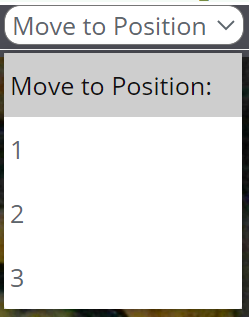
Return to Top